Insights
Money opens Insights, a bounded weekly view of recorded earnings, working time and expenses. Home, Work and Money remain the three tabs. Work and its active controls stay one tab away.
Reading the history
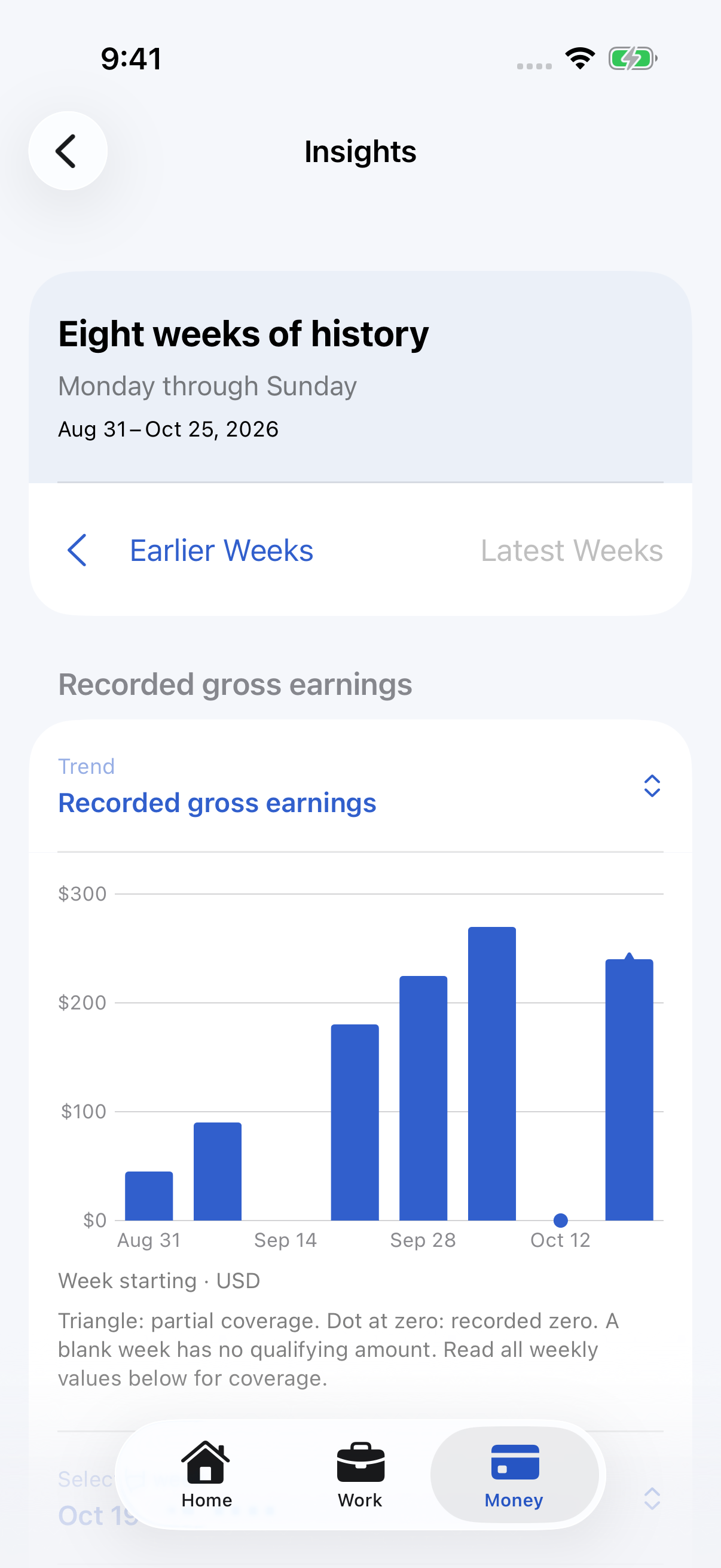
The range contains eight consecutive Monday-to-Sunday weeks, ending with Money's selected week.
Earlier Weeks steps back eight weeks and selects the week just before the previous range; Latest
Weeks returns to the current week. Previous Week and Next Week continue past either end of the
range, moving it eight weeks at a time; only the week in progress has no Next Week. The selected
week, its menu and both buttons are decided from the calendar rather than from loaded figures, so
they stay usable while figures load, after a refresh and for weeks with nothing recorded. Changing
the Trend keeps the selected week. The range follows
ReportingPeriod.weekCalendar, including the reporting timezone, DST and year boundaries. Internally
weeks are half-open: Monday at midnight through, but excluding, the next Monday.
The Trend picker switches between recorded gross earnings and gross per working hour. Both use
columns with a zero baseline, without smoothing or interpolation. The axis labels every other week,
ending with the newest, and names a month only where it changes (for example Sep 21, Oct 5,
19, Nov 2); the week menu and weekly values give exact ranges. A shaded band marks the selected
week, including a week whose amount is zero or missing. The week picker and Previous/Next
Week buttons select exact dates and values. Charts do not intercept scrolling with selection gestures.
A triangle identifies nonzero partial coverage; a dot at zero represents a recorded zero, including
a partial-zero point whose coverage is explained in text. A blank week has
no qualifying amount. Read All Weekly Values provides the amount and coverage for every week,
including empty ones. A series without qualifying money explains the absence instead of drawing zero.
- Recorded gross earnings: sums amounts entered on completed shifts. Missing amounts do not contribute. An explicit zero contributes to coverage. Delivery gross is independent and never added.
- Working time: sums valid completed working durations, excluding pauses. Its own contributing count accompanies it. A shift belongs wholly to the week containing its start, including overnight work.
- Gross per working hour: sums recorded shift gross and divides by summed valid positive working hours from those same shifts. Missing gross and invalid or zero durations do not enter this paired subset. It never averages shift rates. Both contributing and eligible completed-shift counts appear.
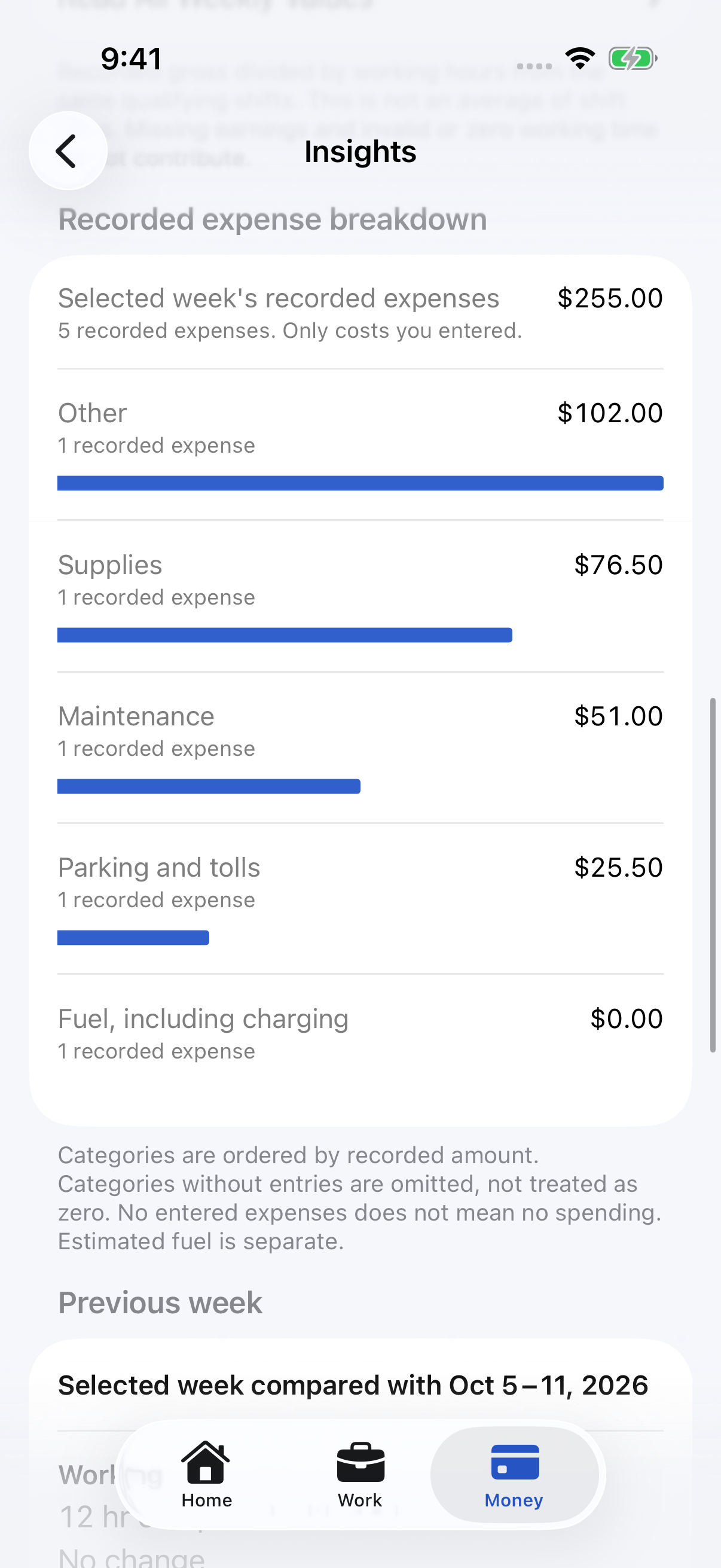
- Recorded expenses: sums entered costs by
occurredAt, independently of shifts. The five existing categories retain their definitions, including charging under Fuel. Amounts and record counts remain readable beside ranked horizontal bars. Zero entries stay visible; categories with no entries are absent, not zero. Category amounts reconcile with the selected week's recorded total. No entry is evidence of no spending. Estimated fuel is not combined with purchases or subtracted here.
All arithmetic and exact labels use Decimal-backed Money. Binary floating point is used only to
position marks and format chart axes. Axes use USD, compact labels and a zero baseline. No money is
inferred from delivery records, missing records, chart geometry or historical patterns.
Previous week
The selected week is compared only with its immediately preceding equivalent week, using
PeriodComparisonCalculator. Both figures and their bases remain visible. Percentages are refused
for missing figures, zero baselines, incomplete coverage, and a week still in progress. Expense
completeness is unknowable, so expense percentages are always refused. Supported differences use
neutral wording. Current-week history is labelled partial-to-date, with no change headline against
the completed previous week. These are records, not predictions, rankings or advice.
Open Selected Week Report reaches the existing report, its saved hourly-target summary and export. Insights adds no target persistence or target visualization. Corrections to authoritative earnings, pauses or expenses update the derived history.
Accessibility and scope
At accessibility Dynamic Type sizes, charts give way to readable selected values and an expandable list of weekly values. Dates, amounts, missing states and coverage are available through standard controls and VoiceOver elements. Native blue roles adapt to light, dark and increased contrast; no meaning relies only on color. No custom animation or timer is added.
The screen loads eight displayed weeks plus the preceding comparison week. It does not provide daily, monthly, annual or all-time charts. No chart aggregates are persisted, and no routes or deliveries are requested for this screen. Architecture describes the shared cancellable loader. Testing describes synthetic probes and simulator verification.
Reporting timezone and rollover
Weeks follow the reporting Calendar's timezone, rather than UTC or the timezone where an amount was entered. The same instant can fall on Sunday in one timezone and Monday in another. Changing the reporting timezone can therefore change which week contains a shift's start or an expense's date. Records themselves are not rewritten, and an overnight shift is never split.
The current range refreshes when the calendar day changes or the app becomes active. A chosen week stays selected while it remains in the range; a historical range stays selected; Latest Weeks returns to the current week. Current-week comparisons explain that the week is in progress. The domain tests cover the exact Monday boundary, DST, differing timezone membership, missing and partial weeks, and large Decimal amounts.