Architecture
CaseNotes is a small SwiftUI application over SwiftData models. Rules that can be stated and tested independently live outside the views.
CaseNotes/
  CaseNotesApp.swift    Application entry point and model container
  Models/               SwiftData models and the editing draft
  Logic/                Testable behavior without SwiftUI imports
  Views/                SwiftUI screens and platform adapters
  DesignSystem/         Shared theme and motion tokens
State ownership
SwiftData owns persisted notes, folders, and drawing records. Views query or receive those models and keep only transient interaction state locally.
NoteDraft is a value type that isolates text editing from the persistent
model. Directly binding controls to a SwiftData model would write changes
through immediately and make Cancel unreliable. The drawing editor follows the
same boundary by holding its live PKCanvasView until Done.
The draft also carries the note's attachments, mixing files the note already has with files the current edit has staged. An imported document is copied into a staging directory rather than into the note's own storage, so the same Save and Cancel boundary covers files as well as text.
Saving an existing note goes through NoteHistory, which keeps the version the
edit replaces before the draft is applied, and then through NoteAttachments,
which reconciles the files. They are separate calls because they answer
different rules: only authored text produces a version, while an attachment
change moves the edit timestamp without producing one. Creating a note applies
its draft directly, since a new note has no earlier version to keep.
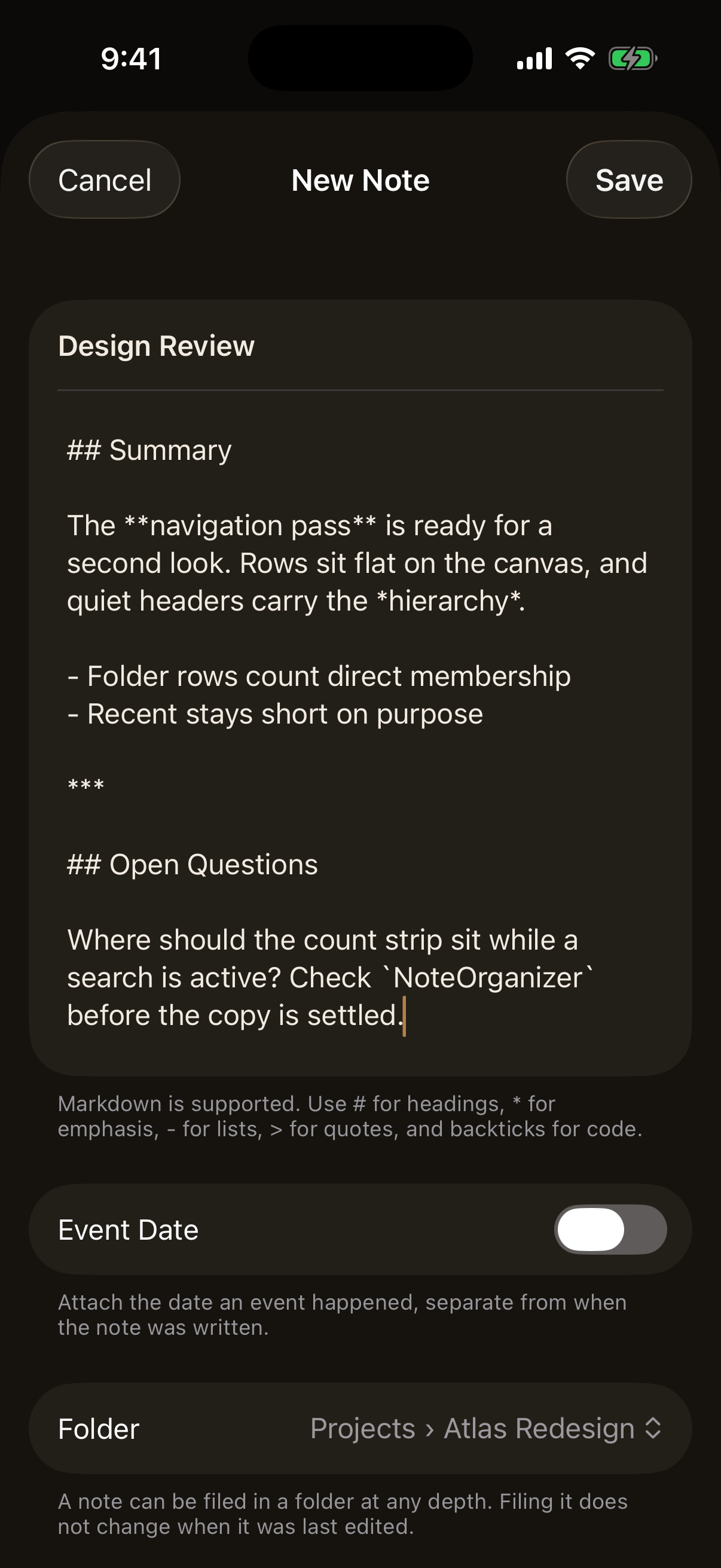
Nothing in that screen has reached the store yet. Cancel discards it, and Save hands the finished draft to the caller.
For relationship rules, migration coverage, and timestamp behavior, see SwiftData and Persistence. Authentication and scene lifecycle behavior are documented separately in App Lock and Privacy.
Logic boundaries
NoteOrganizerowns scope filtering, search, pinning, and sorting.FolderHierarchyowns the folder tree: ancestor and descendant traversal, display paths, which moves are legal, and what deleting a folder does to the folders and notes inside it.FolderTreebeside it groups a fetched set of folders by parent in one pass, which is what browsing screens and destination pickers read instead of walking relationships per row.NoteHistoryowns version history: when a previous version is kept, the order history reads in, and what restoring one does.MarkdownDocumentconverts Markdown source into renderable blocks, and divides those blocks into the regions read mode can fold.MarkdownSourceMapsays which characters of the source produced which blocks, which is what Live Preview needs and what the parser does not report. It proposes boundaries with a cheap scan and accepts one only when the text between two of them parses on its own into exactly the blocks the whole document has at that position, so Foundation stays the only authority on what the Markdown means.MarkdownEditingModenames the three ways the editor can show Markdown.ListDateStyledecides how much of a date a compact row spells out, and formats it for an injected calendar and locale.AttachmentStoreowns attachment files: the directories they live in, how an imported document is staged and then committed, and how one is deleted. It knows nothing about notes.NoteAttachmentsowns the model rules around those files: display order, what a save does to the list, and what has to happen before a note is deleted. It reaches the file system only through the store.AttachmentDescriptorderives what a row says about a file: its type, its size, and the phrase a screen reader hears.InlineAttachmentMarkerowns the syntax that places a file inside a note's Markdown, and finds the lines that could be one.InlineAttachmentsowns what a placement is and what may be done to it: listing placements, writing one at an editing position, moving one a block through the document, and lifting one out. Every operation rewrites the body and nothing else.InlineAttachmentSourceresolves a placement's identity against the files a note actually holds, answering with what to draw or with nothing at all.NoteExportdefines the exact text and file representation leaving the app.NotePDFRendererlays a note out as a paginated PDF document, working from a value copy of the note's authored content rather than from any view.AppLockControllerowns authentication and scene lifecycle policy behind aDeviceAuthenticatorprotocol.
Rendering work
Folder hierarchy is derived rather than stored. A location is built by walking the parent chain when it is displayed, so renaming or moving a folder needs no rewrite of anything beneath it and no path string can go stale.
A placed file is a parsed block like any other. The reference is invisible to
Foundation, which reads it as ordinary text and discards the difference between
one that was written and one that was escaped, so MarkdownDocument cuts each
candidate line out of the source, parses the piece before it on its own, and
accepts the placement only when those pieces are exactly the blocks the whole
body already has at that position. That is the same argument MarkdownSourceMap
makes about boundaries, and it is what keeps a reference inside fenced code,
indented code, inline code, or an escape sequence as the literal text it is. A
body holding no reference text pays one substring search for all of it.
MarkdownBlockView is the one place a parsed block becomes pixels, so reading
and Live Preview cannot drift apart. MarkdownLivePreview lays out the regions
and owns which one is active; MarkdownSourceRegionEditor is a deliberately
narrow UITextView bridge that holds one region's characters, because SwiftUI
exposes neither the cursor's position nor a way to place it. Dividing a whole
note costs more than parsing it, so it happens when a note is opened or a region
is entered, never on a keystroke: an edit re-divides only the span it touched
and splices the result back into the map. A division that was proved against
exactly the body on screen is reused rather than made a second time, so opening
a note and then tapping into a paragraph divides it once instead of twice. A
division a keystroke repaired locally is never reused that way, because proving
it again is what settles Markdown that is only half typed.
Markdown parsing is retained in MarkdownText state and refreshed only when
the source changes. Section division happens once with the parse rather than on
demand, so folding a section costs a redraw and no reparsing. List previews
parse only an opening fragment instead of an entire long note, and a row
prepares that preview once for an update rather than once for each place it is
read. Folder scope counts are accumulated in one pass, as is the grouping of
folders by parent, so a screen showing folders issues no fetch per row and
counts no descendants.
The version history list uses the same plain-text preview strategy as the notes list, so showing a long history parses no Markdown. A historical body is parsed only when that version is opened. The library's Recent rows show a title and a date only, so opening the app parses nothing.
Drawing bytes use external SwiftData storage and are read only when the drawing view or editor opens. Rasterization is keyed to the drawing edit timestamp so unrelated view updates do not rebuild the image.
Attachment storage
Attachment bytes are deliberately not held in SwiftData. A NoteAttachment
record carries metadata only, and the file lives in an Attachments directory
the application owns inside Application Support. Files are named after the
attachment's identity rather than after the document, which is what lets two
files that arrived under the same name coexist and removes any need to make a
user's file name safe for a path. The name the reader knows is kept as metadata.
No path is persisted. Sandbox locations change between installs, so the URL is rebuilt from the store's directory and the recorded file name on every read, and a recorded name that is not a single path component is refused rather than resolved.
Importing copies the chosen file into a staging directory under the container's
temporary area. The copy takes security-scoped access and reads through
NSFileCoordinator, so a document owned by a file provider is copied in a
consistent state, and the content type is read from the file rather than
inferred from its name. Saving then moves the staged file into the attachments
directory, which is a rename inside one container rather than a copy that could
stop halfway. Cancelling deletes what the edit staged, and the whole staging
directory is cleared at launch so an interrupted edit leaves nothing behind.
Removal is ordered deliberately: the store is written before the bytes are deleted. The two cannot be made one transaction, and this direction means an interruption can only leave a file nothing points at, never a note listing an attachment it cannot open.
A file placed in the writing is a reference to that same record rather than a second copy, so nothing above changes when one is placed. Placed images are decoded off the main actor at a bounded size through Image I/O and kept in a small cache keyed by the attachment's identity, so a note holding photographs does not decode them again on every keystroke, and a file that moves out of staging on save costs no second decode.
Previewing uses QLPreviewController through a small representable. Quick Look
already reads every format the importer accepts, so no document renderer is
written here, and the preview is titled with the name the file arrived with
rather than the name it is stored under.
PDF generation
NotePDFRenderer builds a PDF with UIGraphicsPDFRenderer and typesets it with
Core Text, both first-party. Core Text lays each block into whatever height is
left on the page, reports how much of the block fitted, and the remainder
continues on the next page, which is how a long paragraph, list, or code block
crosses a boundary without losing a line at the seam. Text is drawn as text, so
a reader can select and search it; only a PencilKit drawing is rasterized.
Rendering never reads the reading view. It takes a NotePDFRenderer.Content
value holding the title, the optional event date, the body, and the drawing
bytes, and it parses the body with the same MarkdownDocument read mode uses.
Section folding lives in view state and has no route into the exporter.
Generation happens inside the share item's transfer representation, so it runs when a destination is chosen rather than while the actions menu is on screen. It runs on the main actor, because rasterizing a PencilKit drawing is not documented as safe anywhere else and an export is one document on an explicit user action.