Content and Export
Markdown storage and rendering
The note body is stored as its original Markdown source. Reading mode parses it
with Foundation AttributedString and reconstructs block structure from
PresentationIntent for SwiftUI layout.
Supported presentation includes headings, paragraphs, bold, italic, inline code, links, ordered and unordered lists with nesting, block quotes, fenced code blocks, and thematic breaks. Hand-authored line breaks remain visible.
Parsing requests a partial result for malformed input. If parsing still fails, the renderer presents the source as plain text so content remains readable.
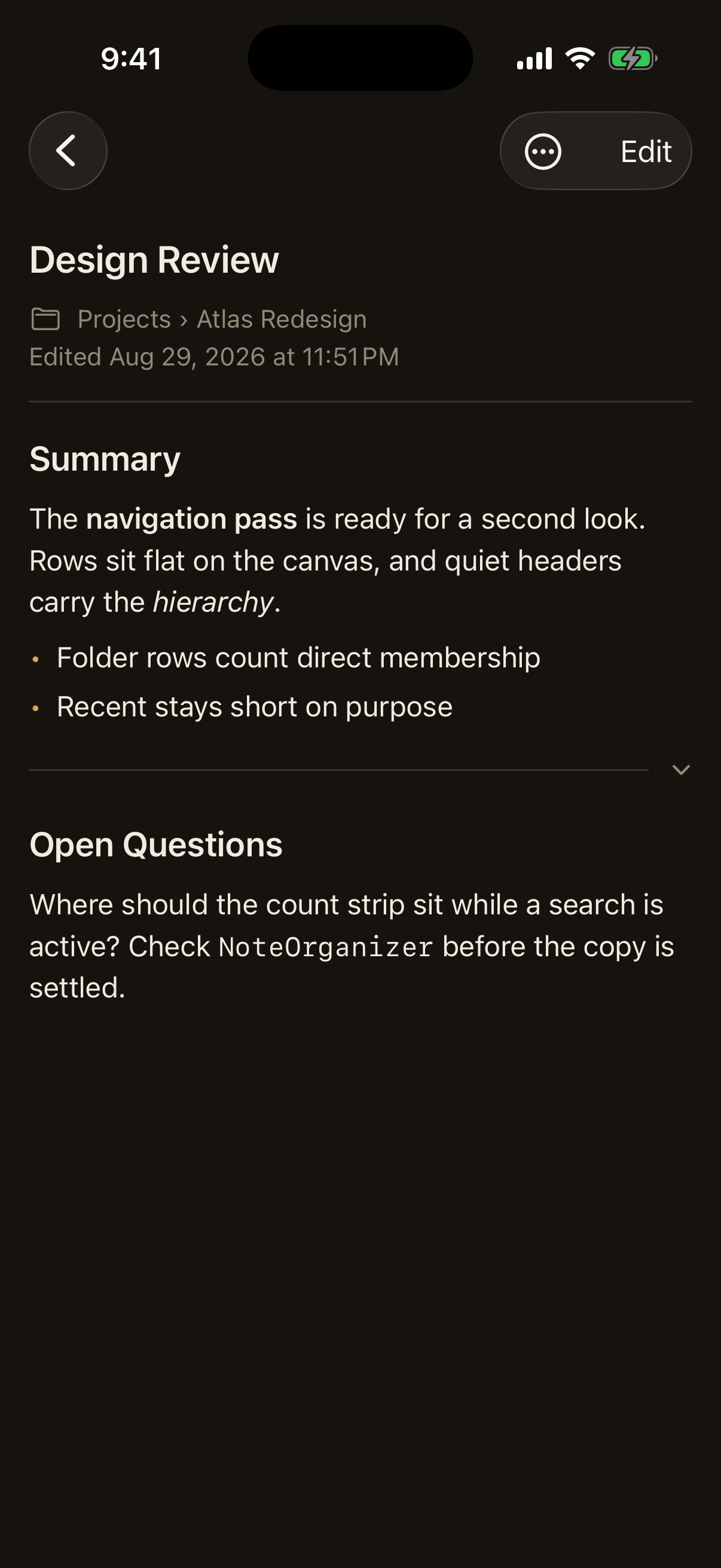
The three Markdown modes
The note screen is Reading: the stored body, fully rendered, with nothing to type into. The editor offers all three modes from one menu in its toolbar, and the mode names the view rather than only tinting it.
- Reading renders the draft through the same view the note screen uses, collapsible sections included, and offers no way to type.
- Live Preview renders the draft and exposes the Markdown source of the one region holding the cursor. It is the mode the editor opens in.
- Source is the complete Markdown source in one field, which is the editor this app has always had.
Switching between them changes what is on screen and nothing else. No text is rewritten, the draft is untouched, the note's edit time does not move, and no version is recorded. The mode is not remembered between edits: the app stores no preferences, and a display choice is not a reason to start.
Live Preview
Live Preview divides the body into regions and renders all of them except the one the cursor is in, which is shown as its own Markdown source in a field of its own. Moving the cursor renders the region being left and opens the region being entered. Tapping rendered content enters the region under the tap and puts the cursor near the words that were touched.
A region is the smallest span of source that parses on its own into exactly the blocks the whole note parses into at that position. That is checked against Foundation's parser rather than assumed, which is why a fenced code block, a block quote, a multiline paragraph, an indented code block split by a blank line, a nested list item, and a setext heading each travel whole rather than being cut at a line that merely looks like a boundary. A thematic break is a region of its own, so entering one edits the break and not the paragraph beside it.
The stored Markdown stays the single source of truth. An edit is written back into the span its region owns and every other character is carried through untouched, so nothing is normalized, reflowed, or reformatted. Malformed Markdown stays editable and keeps its own region.
Cursor placement is answered by real text layout rather than by counting
characters, so it survives Dynamic Type, wrapping, emoji, and non-Latin text.
It is close rather than exact: the source of a region shows syntax the rendered
form hides, so a tap late in a line that contains ** or a link can land a
character or two from the glyph that was touched. It always lands in the right
region and on the right line.
Two limits are worth stating. A selection cannot span two regions, because each region is its own field; Source mode is there for a change that has to reach across the whole note. And a region grows to hold what is typed into it, so writing several blocks without moving the cursor leaves them all as source until the cursor moves.
Collapsible sections in read mode
A thematic break divides a note into regions that read mode can fold. Each break becomes a divider carrying a collapse control, and it owns the content after it up to the next break or the end of the note, so folding one region never hides another. Content written before the first break has no divider of its own and is always visible.
Every thematic break the parser recognizes behaves the same way, whether it is
written as ---, ***, ___, or a spaced variant. Recognition comes from the
parsed document rather than from matching lines of text, so a rule inside a
fenced or indented code block stays code, and a line of dashes under a line of
text stays the setext heading Markdown says it is.
Folding is presentation only:
- The stored Markdown is never rewritten, and no marker is added to it.
- Source mode shows the complete body, including every break. Live Preview renders a break as a plain rule and offers no collapse control, so folding is read-mode presentation and never mixes with editing.
- Collapsing does not change the note's edit time and records no version.
- Copy, share, and file export always use the whole body.
- Search reads the stored body, so collapsed text still matches.
Collapsed state lasts as long as the note stays open. Nothing is persisted, and every region starts expanded when a note is opened again. Two breaks in a row, or a break ending a note, leave a region with nothing in it, which renders as a plain divider with no control rather than an empty thing to fold.
List previews
Rows show a compact plain-text preview with Markdown syntax removed. Only the opening fragment is parsed because the row can display only a small amount of text. Whitespace is collapsed to a single line.
Export contract
A note leaves the app in one of two forms, and the difference is deliberate. Markdown export is the authored source, so it preserves the syntax the note is stored as and can be edited again elsewhere. PDF export is a rendered document, so it shows the note the way read mode shows it rather than exposing the syntax. Neither replaces the other.
Both exporters accept injected locale and time-zone values so date output is deterministic in tests, and both take only authored content: the title, the event date when there is one, and the body. Creation and edit timestamps, folder membership, pinned state, version history, and read-mode collapse state stay private to application bookkeeping and reach neither format.
Attached files reach neither format either. An attachment is a document the note points at rather than part of what the note says, and concatenating a PDF or a Word file into an export would produce something the user did not write. There is no archive format that carries a note and its files together.
A file placed inside the writing follows the same rule, and the two formats differ in how. A Markdown export is the authored source, so the reference travels verbatim along with everything else the note holds; it will read as plain text wherever the file is opened, since the syntax is CaseNotes's own. A PDF is a rendered document and a placement is left out of it entirely, because a PDF carries no file the reader can open and drawing a reference to a document they do not have would say less than saying nothing. Rendering placed images into an exported PDF would be a worthwhile enhancement and is deliberately not part of this one.
Markdown file
The generated document contains:
- The note title as a Markdown heading.
- The event date, when present.
- The stored body without rewriting it.
- A text notice when a drawing is attached.
Drawings are not embedded in the Markdown file, because a Markdown document cannot carry one without a companion image.
PDF file
The generated document contains, in order:
- The note title, then the event date when there is one, above a rule.
- The body with its Markdown rendered: headings, bold, italic, inline code, links, ordered and unordered lists with nesting, block quotes, fenced code blocks, and thematic breaks.
- The note's current drawing, when it has one.
The page is US Letter with a one inch margin, and long notes paginate across as many pages as they need. The document is typeset rather than screenshotted, so its text can be selected, searched, and printed at full quality, and the file stays small. Only the drawing is an image.
A thematic break renders as a plain rule. Read mode's collapse controls are interface, not content, so no chevron or collapsed marker appears in a PDF, and the whole note is exported whatever is folded on screen at the time.
The PDF uses a light document appearance in both app appearances. A file meant to be read, shared, and printed should not arrive with a dark background because the app was in dark mode when it was exported.
Markdown links keep their styling and are written as real PDF links, so a reader can follow them. Code blocks are set in a monospaced face on a tinted panel and wrap long lines rather than running off the page. There is no syntax highlighting.
A drawing is rasterized at the aspect ratio it was drawn in. One too tall for the room left on a page moves to the next page, and one too tall for a whole page is scaled to fit rather than cropped. A drawing that is empty, or whose stored bytes no longer decode, is left out and the note's text still exports.